
AI-Powered Notebook
AI workflows in notebook can be run using different execution modes depending on how much control and confirmation you want during execution.
The available modes are:
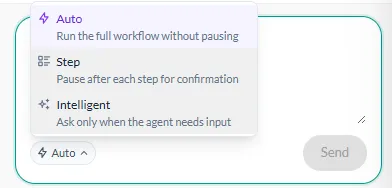
Auto runs the full workflow without pausing.
Use Auto when you want the workflow to execute continuously from start to finish without requiring confirmation after each step.
Step pauses after each step for confirmation.
Use Step when you want to review the result of each step before the workflow continues.
Intelligent
Section titled “Intelligent”Intelligent asks for input only when the agent needs it.
Use Intelligent when you want the workflow to run automatically in most cases while still allowing the agent to ask for information when it cannot continue without your input.
Choosing a workflow mode
Section titled “Choosing a workflow mode”| Mode | Workflow behavior | Best suited for |
|---|---|---|
| Auto | Runs the full workflow without pausing | Uninterrupted execution |
| Step | Pauses after each step for confirmation | Reviewing and controlling each step |
| Intelligent | Asks for input only when the agent needs it | Mostly automated execution with input when required |
Choose the workflow mode that matches the level of control you want during notebook execution.